
Two surfaces, one auth
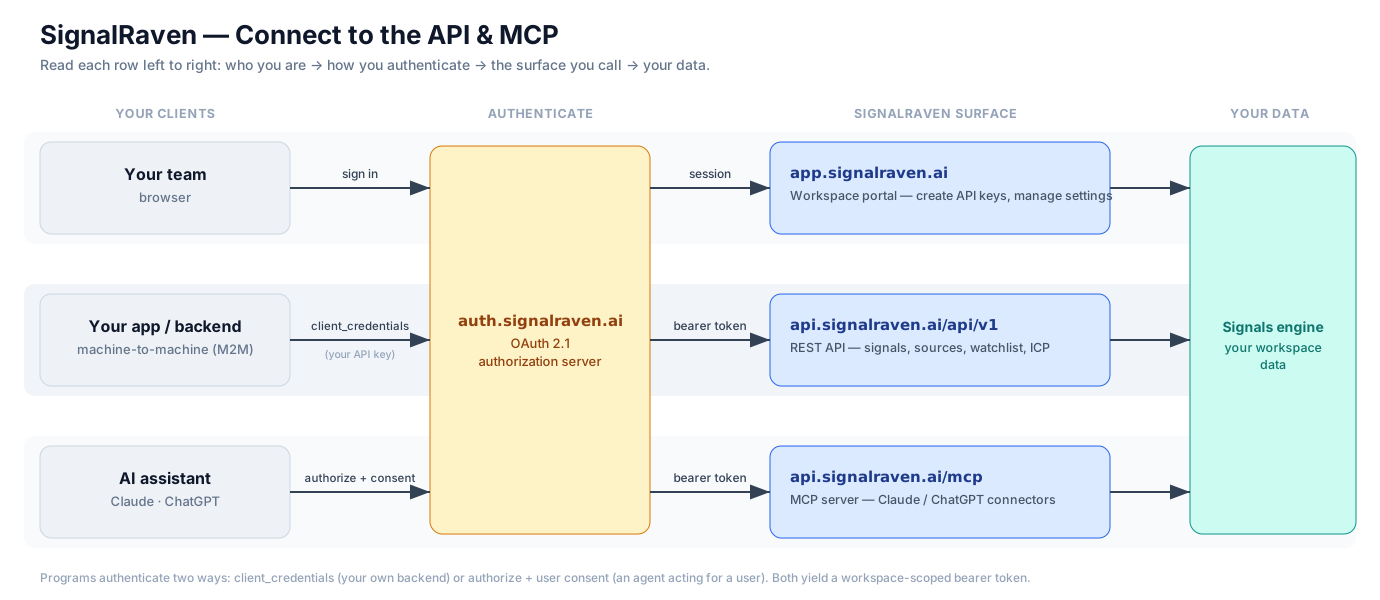
- REST API —
api.signalraven.ai/api/v1— for your own backend, scripts, and data pipelines. - MCP server —
api.signalraven.ai/mcp— for AI assistants like Claude and ChatGPT.
Both authenticate with OAuth 2.1 via auth.signalraven.ai and return the same workspace-scoped data. Everything is read-only today.
REST API
API reference →
Endpoints, scopes, auth, examples.
MCP
MCP server →
Tools, transport, discovery.
Connect
Claude / ChatGPT →
Add SignalRaven to your assistant.
Get started
- Create an API key —
app.signalraven.ai→ Settings → API keys (workspace admin). You’ll get a client id + secret once. - Exchange it for a token at
auth.signalraven.ai/oauth2/tokenusing the OAuthclient_credentialsgrant. - Call the API or MCP server with the bearer token. See the REST reference or MCP reference.